More consistent form listeners in Google Tag Manager
Sick of the Google Tag Manager built-in form listener not working? This hosted form listener fires when the thank you page or message appears.
The problem
There are many ways to build a form on the web, which makes tracking successful submissions hard. Each of these breaks a naive listener:
- The form prevents the default submit event and posts through JavaScript instead.
- The form redirects to a thank you page before the tag can fire.
- JavaScript calls
form.submit()directly, which dispatches no submit event at all. - The form dispatches submit events even when it is invalid, so failures get counted as conversions.
- A site search box sits on the same page as the form you actually care about.
- The site is a single page app, so the form is not in the DOM when your tag fires.
If you need help with something similar to this blog post, then get in touch through my contact page.
Get in touchThe solution: wait for the thank you
When someone clicks the submit button, you cannot know whether the submission will work. So split it in two:
- When any form is submitted, grab the field values and stash them in
sessionStorage. - When the site shows the submission succeeded, fire the event using the stashed values. The signal might be a thank you page loading, a thank you message appearing or the SPA router changing route.
The website’s own success signal becomes the conversion. If the submission fails, that signal never comes and nothing fires, which solves the invalid-submission and site-search problems. Because the captured data lives in sessionStorage, it also survives a full page navigation.
The script is hosted here, for loading from a Custom HTML tag:
https://cdn.curtiswarner.work/mega-form-listener.js
It is plain ES5 in an IIFE with no dependencies. It listens on document in the capture phase rather than binding to individual buttons, so it does not matter whether the form was in the DOM when the script loaded.
I cover the caveats in the closing comments.
Installing it
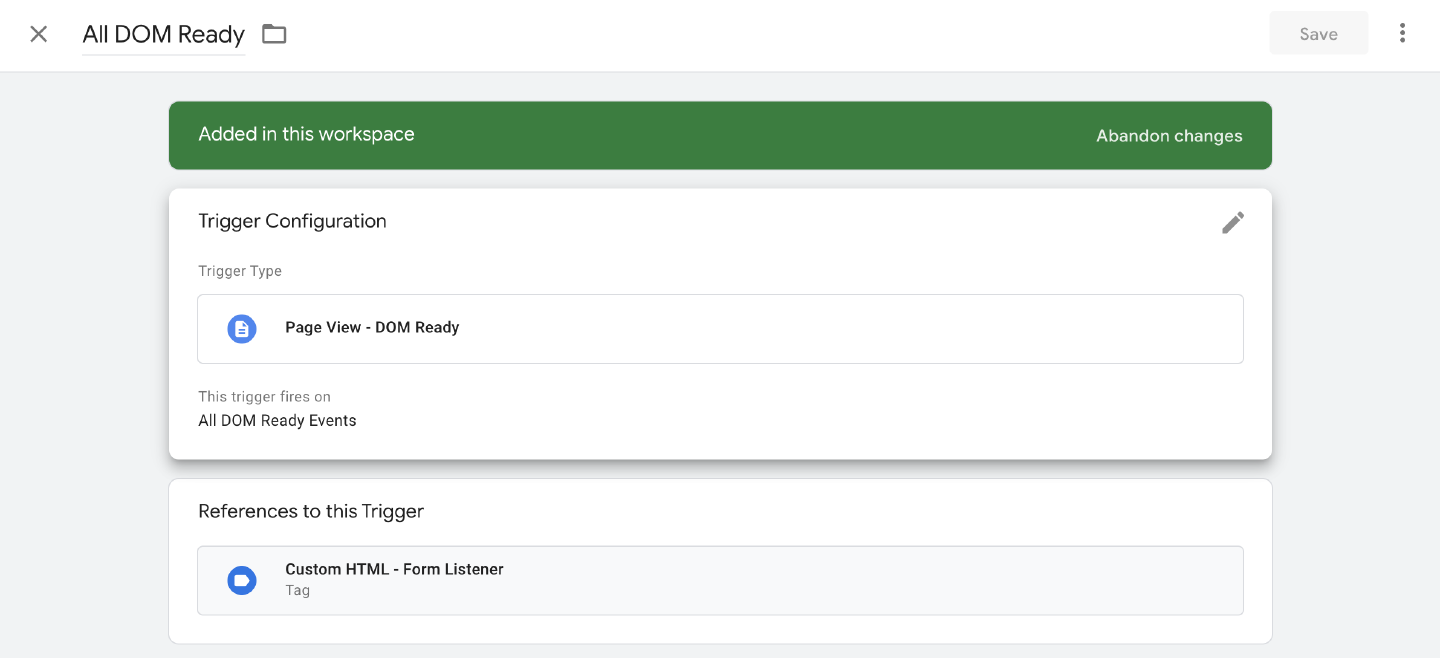
Create a new Custom HTML tag in Google Tag Manager, paste the snippet below in, and fire it on all DOM Ready events.
Fire it once per page load and no more. Do not add a virtual page view trigger for single page apps: the listener watches for route changes itself, and re-firing the tag would inject a second copy of the script and leave you with two instances both reporting the same submission.
Set the config object before the script tag. The script auto-initialises the moment it loads if it finds window.MegaFormListenerConfig, so declaring the config first avoids a race.
<script>
  window.MegaFormListenerConfig = {
    thankYouUrl: '/thank-you',
    thankYouSelector: '.form-success-message'
  };
</script>
<script src="https://cdn.curtiswarner.work/mega-form-listener.js"></script>
Use the same tag, with the same config, on every page. The page holding the form and the page confirming the submission are often not the same page, and both ends need the listener.
Trigger
Configuration
| Option | Default | What it does |
|---|---|---|
thankYouUrl |
null |
String or RegExp tested against the full window.location.href. A string is a case-insensitive “contains” match. |
thankYouSelector |
null |
CSS selector for an element that only exists, and is visible, after a successful submission. |
dataLayerName |
'dataLayer' |
Change it if your container uses a renamed dataLayer. |
eventName |
'form_submit' |
The event value pushed to the dataLayer. |
storageKey |
'mega_form_listener_pending' |
The sessionStorage key holding the pending submission. |
persistenceTimeout |
3600000 |
How long, in milliseconds, a pending submission stays valid. One hour by default. |
debug |
false |
Logs every capture and every success check to the console. Turn it on while you set it up. |
thankYouUrl and thankYouSelector are the options that matter, and you need at least one of them. With neither set, the listener captures submissions and then waits forever for a signal that never arrives.
Set both where you can. They are evaluated as an OR, so whichever arrives first fires the event, and a form that sometimes redirects and sometimes swaps in a message is covered either way.
Scenario 1: a thank you message appears in place
The most common case. The form posts over AJAX and replaces itself with a message. Nothing navigates, so there is nothing for a page view trigger to catch.
window.MegaFormListenerConfig = {
  thankYouSelector: '#signup-thanks'
};
When thankYouSelector is set, the listener attaches a MutationObserver to document.body watching child nodes across the whole subtree, plus the style, class and hidden attributes. That covers both patterns: a message injected fresh, and a message that was always in the DOM and just gets un-hidden. Mutations are debounced by 200ms so a chatty framework re-render does not cause a storm of checks.
The element also has to be visible. The check is element.offsetParent !== null, so a display: none placeholder sitting in the markup from page load will not fire anything.
In that demo, the search box submits without firing an event. Search never produces a thank you message, so you do not need to exclude it.
None of the inputs have a name attribute, yet the dataLayer keys read Full name and Email address.
Field names come from labels
For each field the listener works down a priority list:
- The text of a
<label for="...">pointing at the field’s id. - The text of a
<label>wrapping the field. - The field’s
nameattribute. Unnamed field 1,Unnamed field 2, and so on.
Label text wins because it is what the person filling the form read, and because form builders often generate names like field_7. Nested inputs are stripped out of the label text before it is used, so a checkbox wrapped in its own label gets a clean key.
Radio and checkbox groups collapse into one key, with the checked values joined by a comma. Submit, reset, button, image and password inputs are skipped.
Scenario 2: the form redirects to a thank you page
The browser starts unloading the page as soon as the form submits, so a tag fired on click sometimes loses the race with navigation.
window.MegaFormListenerConfig = {
  thankYouUrl: '/thank-you'
};
Here the two halves come apart across a page load. On the form page the listener captures the fields and writes them to sessionStorage. On the thank you page a new copy of the script starts up, reads that pending submission back, checks the URL during init(), matches, and fires. It does not need the form element, which no longer exists.
Pass a RegExp instead of a string when you need to be precise, for example /\/thank-you\/?$/ so that /thank-you-page-builder does not match.
Programmatic submits
That demo has a second button which calls form.submit() from JavaScript. form.submit() does not dispatch a submit event. It also skips the browser’s built-in validation. A listener built on addEventListener('submit'), including GTM’s own, sees nothing. That is why some forms appear to be untrackable.
The script handles this by patching HTMLFormElement.prototype.submit once, notifying every registered instance, and then calling through to the original. The demo shows both paths side by side: the naive listener records the normal submit and misses the programmatic one, while the form data is captured either way.
Scenario 3: single page app route change
In a single page app the “thank you page” is a route. Nothing loads or unloads, and your DOM Ready trigger fired once, before the form existed.
window.MegaFormListenerConfig = {
  thankYouUrl: /step=thank-you/
};
The listener patches history.pushState and history.replaceState and listens for popstate, re-checking the URL after each. It guards against double-patching, so a tag that fires again on a virtual page view will not wrap the same function twice.
Because the submit listener is bound to document in the capture phase rather than to the forms themselves, forms that mount long after the tag fired are still covered. There is nothing to re-attach on route change.
If you need help with something similar to this blog post, then get in touch through my contact page.
Get in touchWhat lands in the dataLayer
One event, only on success:
{
  event: 'form_submit',
  form_id: 'newsletter',
  inputs: {
    'Full name': 'Ada Lovelace',
    'Email address': '[email protected]',
    'Email me occasionally': 'on'
  },
  firstEmailFound: '[email protected]',
  submissionDigest: '2567345861',
  valid: true,
  timestamp: 1785000000000
}
form_id is the form’s id, falling back to its name, then to unknown_form.
firstEmailFound is the first value in any field that looks like an email address. Useful when the email field is not called email, or when someone pastes their address into a free-text box.
submissionDigest is a hash of the visible field values, sorted by key. The same person submitting the same form twice produces the same digest, which makes it a cheap deduplication key downstream. Hidden fields are left out of it, so a rotating CSRF token or timestamp will not change the hash between attempts.
valid is always true. The event only exists because a success signal arrived, so there is no invalid variant to handle.
In GTM, trigger on a Custom Event matching form_submit, then pull whatever you need out with Data Layer Variables, such as form_id, firstEmailFound, submissionDigest, or a specific key like inputs.Email address.
Closing comments
Everything except passwords ends up in the dataLayer
inputs carries the value of every non-password field. That will include names, email addresses, phone numbers and free-text notes, and the dataLayer is readable by every tag in your container and by anyone with the console open.
Do not forward that object wholesale to an analytics platform. Pick out the specific keys you have a reason to collect, and check that doing so is consistent with your privacy policy and whatever consent you have.
One instance per page
Instances register themselves in a global list, and each one listens to every submit on the document. Two instances on the same page will both capture every form and both push an event on either success signal, so you get duplicate conversions. That is why each demo above is in its own iframe rather than all sharing this page.
The easiest way to end up with two is to let the tag fire more than once, which is why the trigger matters. The other is running separate configs for two different forms. Use one config with both thankYouUrl and thankYouSelector set instead.
A lingering thank you element causes false conversions
The success check runs on any DOM mutation while a submission is pending. If your thank you message stays on screen, the listener captures the next form someone submits, such as the search box or a newsletter signup in the footer. It sees the thank you message still showing and fires a conversion with that other form’s values. You can reproduce it in the first demo.
Point thankYouSelector at something that is removed or hidden once acknowledged, or that only ever appears on a dedicated confirmation view.
The email match is permissive on purpose
Excluding valid email addresses costs you more than counting a few false positives, so firstEmailFound uses a loose pattern. It can match something inside a longer sentence. Do not use it to validate email addresses.
sessionStorage is per-tab
A pending submission does not follow the visitor into a new tab, and it is dropped after an hour by default. That is the right trade-off for a form fill, but if your flow involves a payment provider opening a new tab and returning, the pending submission will not be there when they come back.
Hash routers are not patched
Only pushState, replaceState and popstate are watched. A router that only ever writes location.hash will not trip the URL check. Add a thankYouSelector for those.
Some forms will not work
If a form does not work with the listener, turn on debug: true, watch what gets captured and what the success check sees, and adjust from there.